Producers Basics
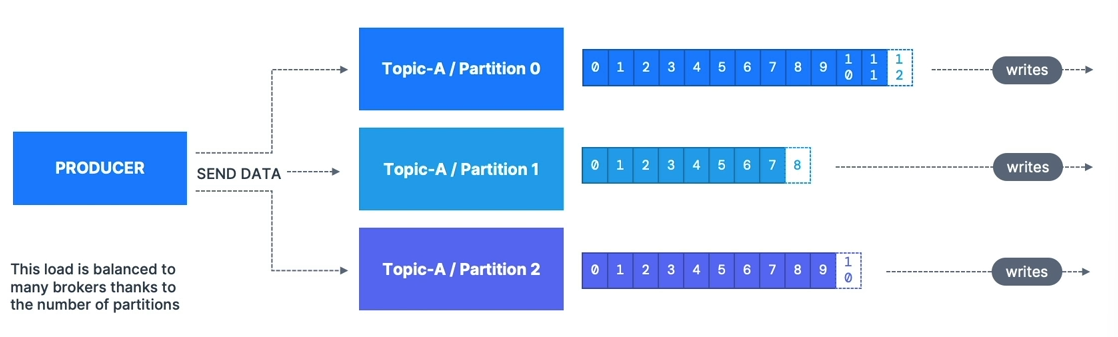
- Producers write data to topics (which are made of partitions)
- Producers know to which partition to write to (and which Kafka broker has it)
- In case of Kafka broker failures, Producers will automatically recover
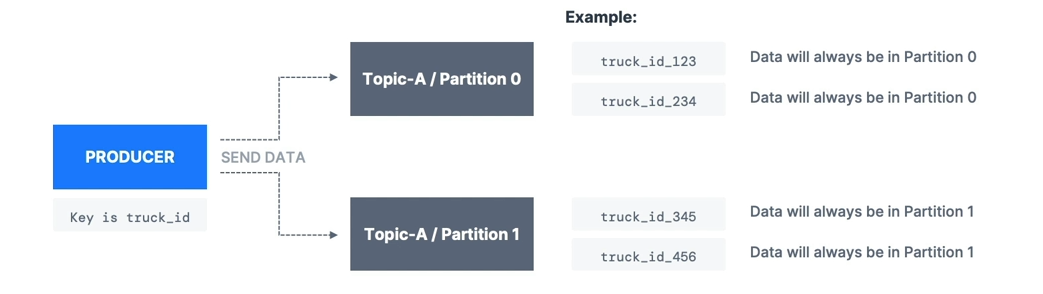
- Producers can choose to send a key with the message (string, number, binary, etc.)
- If
key=null, data is sent round robin (partition 0, then 1, then 2…) - If
key != null, then all messages for that key will always go to the same partition (hashing) - A key is typically sent if you need message ordering for a specific field (ex:
truck_id)
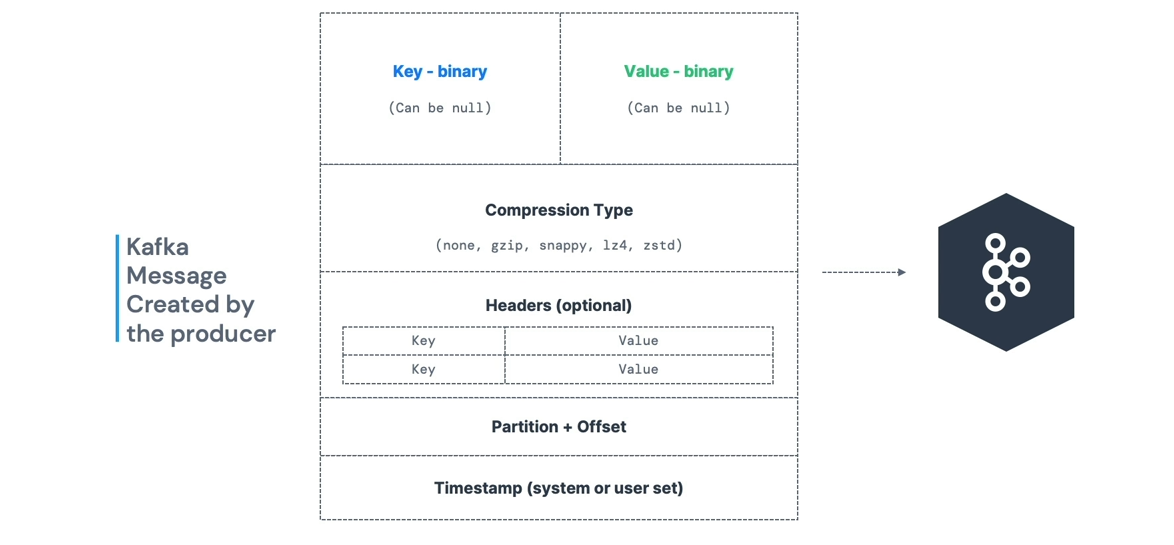
Message Anatomy
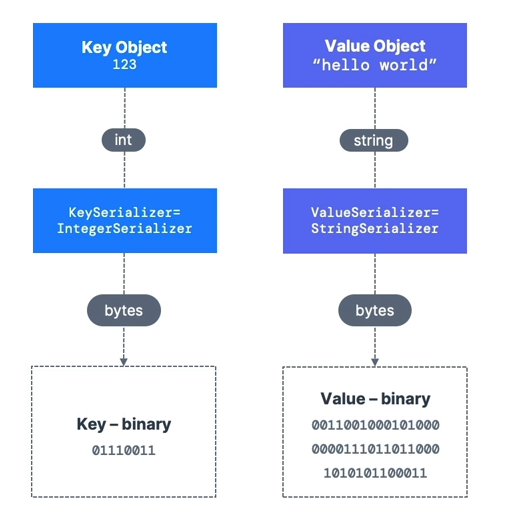
- Kafka only accepts bytes as an input from producers and sends bytes out as an output to consumers
- Message Serialization means transforming objects/data into bytes
- They are used on the value and the key
- Common Serializers:
- String (incl. JSON)
- Int, Float
- Avro
- Protobuf
A Kafka partitioner is a code logic that takes a record and determines to which partition to send it.
- Key Hashing is the process of determining the mapping of a key to a partition
- In the default Kafka partitioner, the keys are hashed using the murmur2 algorithm, with the formula below:

Producer Acknowledgments (acks)
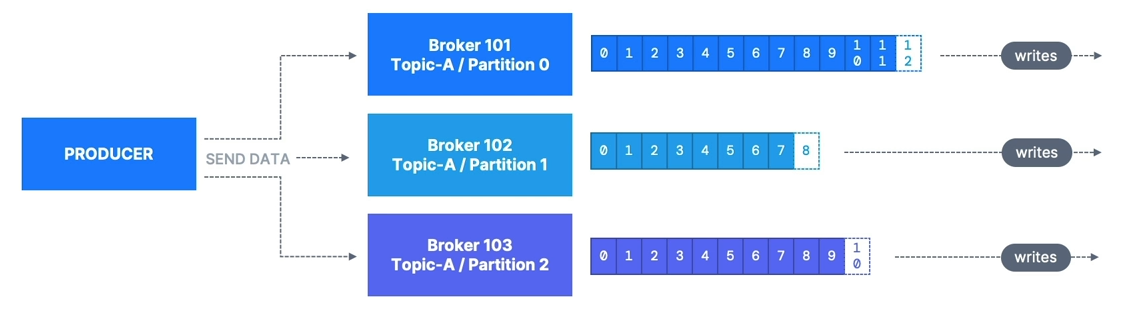
- Producers can choose to receive acknowledgment of data writes:
acks=0: Producer won’t wait for acknowledgment (possible data loss)acks=1: Producer will wait for leader acknowledgment (limited data loss)acks=all: Leader + replicas acknowledgment (no data loss)
Acks 0
- When
acks=0, producers consider messages as “written successfully” the moment the message was sent without waiting for the broker to accept it at all - If the broker goes offline or an exception happens, we won’t know and will lose data
- Useful for data where it’s okay to potentially lose messages, such as metrics collection
- Produces the highest throughput setting because the network overhead is minimized

Acks 1
- When
acks=1, producers consider messages as “written successfully” when the message was acknowledged by only the leader - Default for Kafka v1.0 to v2.8

- Leader response is requested, but replication is not guaranteed as it happens in the background
- If the leader broker goes offline unexpectedly but replicas haven’t replicated the data yet, we have data loss
- If an ack is not received, the producer may retry the request
Acks -1 (all)
- When
acks=all, producers consider messages as “written successfully” when the message is accepted by all in-sync replicas (ISR) - Default for Kafka 3.0+
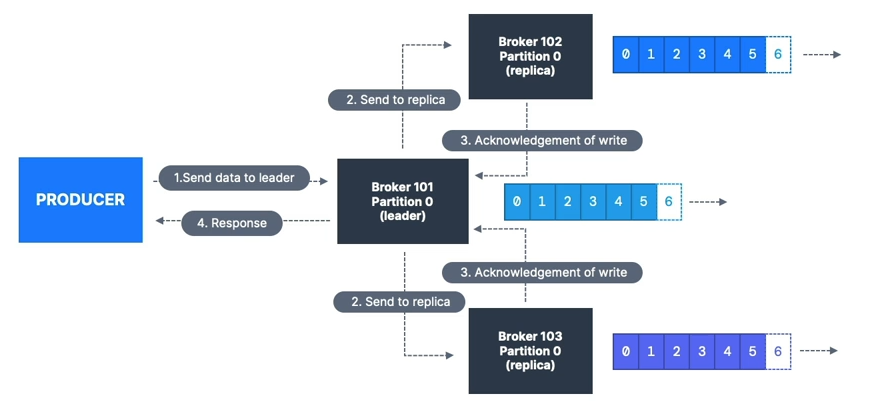
Acks all & Min Sync Replicas

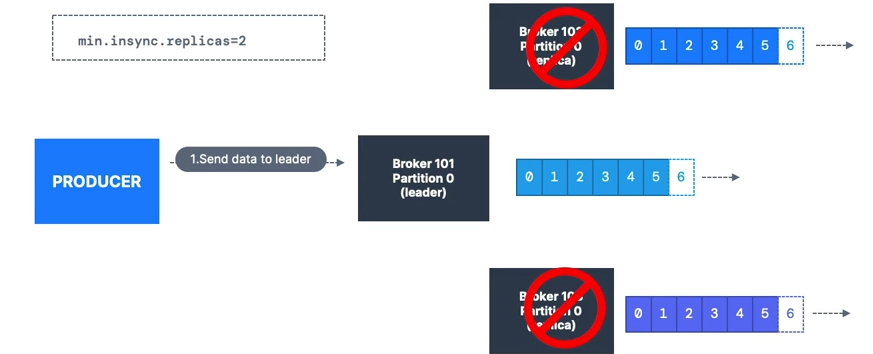
Topic Availability (RF=3)
acks=0&acks=1: if one partition is up and considered an ISR, the topic will be available for writesacks=all:min.insync.replicas=1(default): tolerate two brokers being downmin.insync.replicas=2: tolerate at most one broker down; guarantees at least two writesmin.insync.replicas=3: no tolerance for broker downtime (RF=3) Summary:
Whenacks=allwith RF=N andmin.insync.replicas=M, we can tolerateN - Mbrokers being down for topic availability.
Most popular:acks=allandmin.insync.replicas=2for durability and availability.
Retries
- For transient failures, developers should handle exceptions or data will be lost
- Example:
NOT_ENOUGH_REPLICAS(due tomin.insync.replicassetting) retriessetting:- Defaults to 0 for Kafka ≤ 2.0
- Defaults to 2,147,483,647 for Kafka ≥ 2.1
retry.backoff.msdefault = 100ms
Timeout
- If
retries > 0(e.g., 2,147,483,647), retries are bounded by a timeout - Since Kafka 2.1,
delivery.timeout.ms=120000(2 min) - Records fail if they can’t be acknowledged within
delivery.timeout.ms
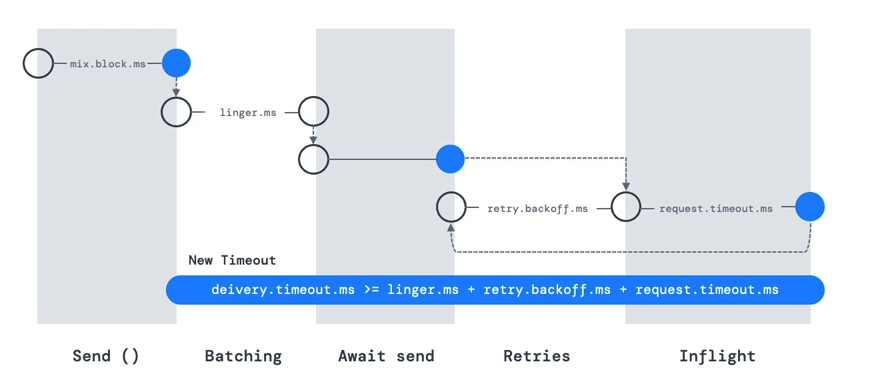
Older Version Timeout & Retries
- Without an idempotent producer (old Kafka), retries can cause out-of-order messages
- Use
max.in.flight.requests.per.connectionto control parallel produce requests- Default: 5
- Set to 1 for strict ordering (reduced throughput)
- Kafka ≥ 1.0.0: better to use idempotent producers
Idempotent Producer
The producer can introduce duplicates in Kafka due to network errors.
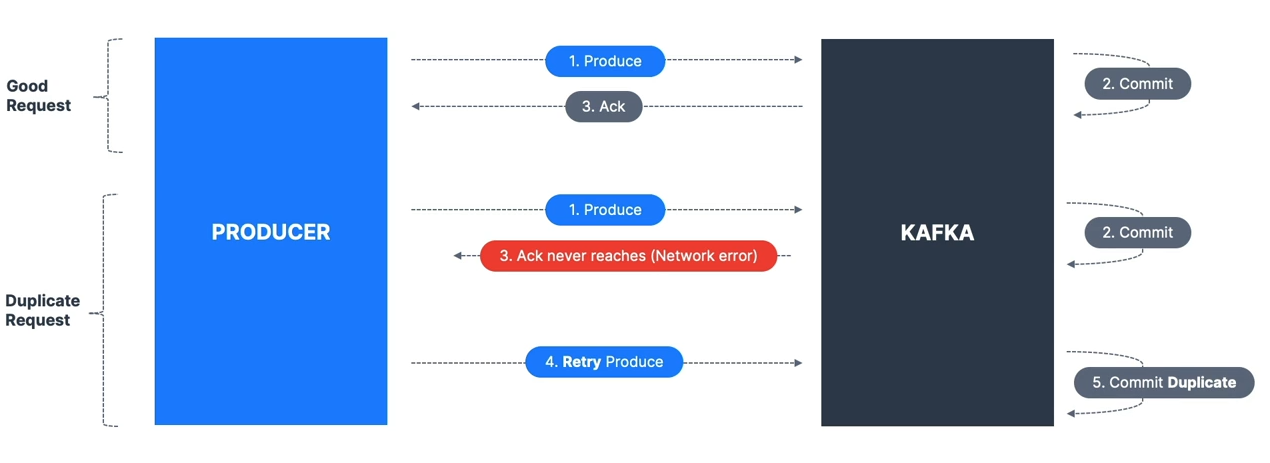 Kafka ≥ 0.11: can define an idempotent producer to prevent duplicates on network errors
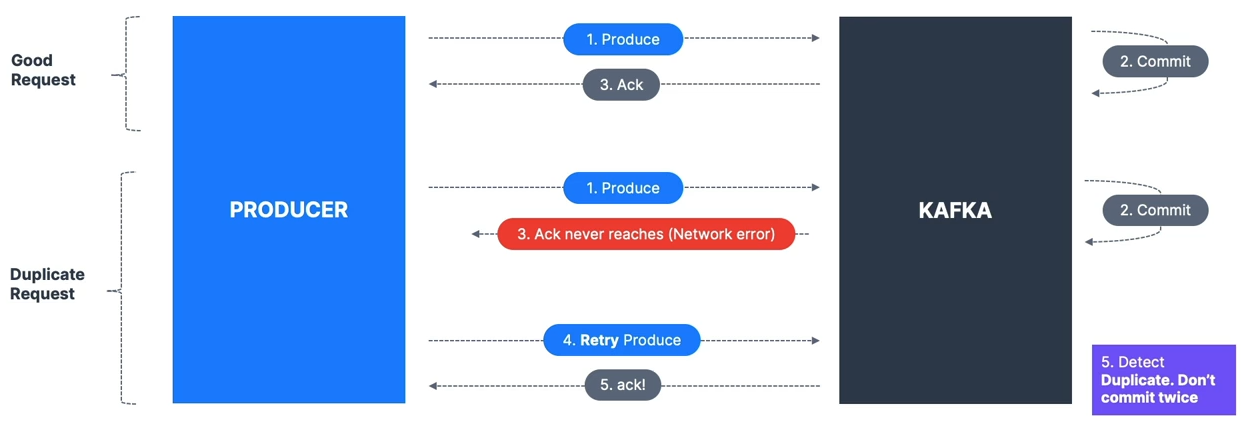
- Benefits: stable and safe pipeline
- Default since Kafka 3.0; recommended
- Includes:
retries=Integer.MAX_VALUEmax.in.flight.requests=1(Kafka 0.11) or5(Kafka ≥ 1.0)acks=all
- To enable:
producerProps.put("enable.idempotence", true);Producer Defaults
- Kafka 3.0 default = “safe”:
acks=all (-1)enable.idempotence=true
- Kafka 2.8 and lower default:
acks=1enable.idempotence=false
- Always use upgraded Kafka clients
Safe Producer Settings
acks=all→ ensures replication before ackmin.insync.replicas=2→ two brokers must have data before ackenable.idempotence=true→ prevents duplicatesretries=MAX_INT→ retry until delivery timeoutdelivery.timeout.ms=120000→ fail after 2 minmax.in.flight.requests.per.connection=5→ max performance while keeping ordering
Compression at Producer Level
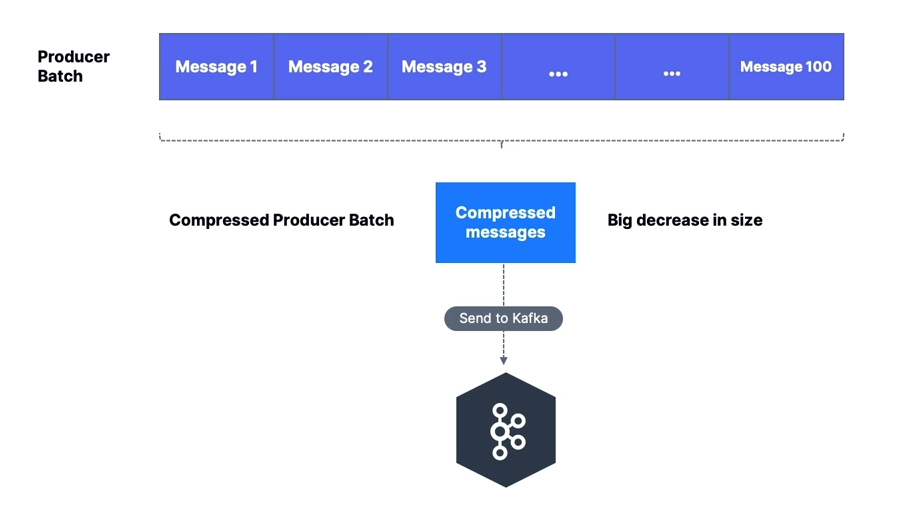
- Producers often send text-based data (e.g., JSON) → compression important
compression.typeoptions: none (default), gzip, lz4, snappy, zstd (Kafka 2.1+)- Works without broker or consumer config changes
- Larger batches = better compression
- Pros: smaller requests, faster transfer, better throughput, less disk usage
- Cons: extra CPU for compression/decompression
Compression at Broker Level
- Set at broker or topic level
compression.type=producer(default): stores producer-compressed data directlycompression.type=none: decompresses all batches- If different from producer compression: broker decompresses and recompresses
- Warning: extra CPU if recompression is enabled
High Throughput Producer
- Increase
linger.ms→ wait for batches to fill before sending - Increase
batch.size→ send larger batches - Use compression for efficiency
properties.setProperty(ProducerConfig.COMPRESSION_TYPE_CONFIG, "snappy");
properties.setProperty(ProducerConfig.LINGER_MS_CONFIG, "20");
properties.setProperty(ProducerConfig.BATCH_SIZE_CONFIG, Integer.toString(32*1024));
Default Partitioner
Key = null
- Kafka ≤ 2.3: Round Robin
- Kafka ≥ 2.4: Sticky Partitioner → sticks to one partition until batch full or linger.ms elapsed, then switches
Key != null
- Murmur2 hashing:
targetPartition = Math.abs(Utils.murmur2(keyBytes)) % (numPartitions - 1);- Same key → same partition
- Adding partitions changes mapping
Max Block
- If producer faster than broker, records buffered in memory (
buffer.memory=32MB) - If buffer full →
send()blocks untilmax.block.ms(default 60,000 ms) expires → throws exception - Usually means brokers are down or overloaded
CLI Examples
- Produce without keys
- Produce with keys
Java API Examples
Basic Producer
    public static void main(String[] args) {
        log.info("I am a Kafka Producer!");

        // create Producer Properties
        Properties properties = new Properties();

        // connect to Localhost
//        properties.setProperty("bootstrap.servers", "127.0.0.1:9092");

        // connect to Conduktor Playground
        properties.setProperty("bootstrap.servers", "cluster.playground.cdkt.io:9092");
        properties.setProperty("security.protocol", "SASL_SSL");
        properties.setProperty("sasl.jaas.config", "org.apache.kafka.common.security.plain.PlainLoginModule required username=\"your-username\" password=\"your-password\";");
        properties.setProperty("sasl.mechanism", "PLAIN");

        // set producer properties
        properties.setProperty("key.serializer", StringSerializer.class.getName());
        properties.setProperty("value.serializer", StringSerializer.class.getName());

        // create the Producer
        KafkaProducer<String, String> producer = new KafkaProducer<>(properties);

        // create a Producer Record
        ProducerRecord<String, String> producerRecord =
                new ProducerRecord<>("demo_java", "hello world");

        // send data
        producer.send(producerRecord);

        // tell the producer to send all data and block until done -- synchronous
        producer.flush();

        // flush and close the producer
        producer.close();
    }
Producer with Batch
    public static void main(String[] args) {
        log.info("I am a Kafka Producer!");

        // create Producer Properties
        Properties properties = new Properties();

        // connect to Localhost
//        properties.setProperty("bootstrap.servers", "127.0.0.1:9092");

        // connect to Conduktor Playground
        properties.setProperty("bootstrap.servers", "cluster.playground.cdkt.io:9092");
        properties.setProperty("security.protocol", "SASL_SSL");
        properties.setProperty("sasl.jaas.config", "org.apache.kafka.common.security.plain.PlainLoginModule required username=\"your-username\" password=\"your-password\";");
        properties.setProperty("sasl.mechanism", "PLAIN");

        // set producer properties
        properties.setProperty("key.serializer", StringSerializer.class.getName());
        properties.setProperty("value.serializer", StringSerializer.class.getName());

        properties.setProperty("batch.size", "400");

//        properties.setProperty("partitioner.class", RoundRobinPartitioner.class.getName());

        // create the Producer
        KafkaProducer<String, String> producer = new KafkaProducer<>(properties);


        for (int j=0; j<10; j++){

            for (int i=0; i<30; i++){

                // create a Producer Record
                ProducerRecord<String, String> producerRecord =
                        new ProducerRecord<>("demo_java", "hello world " + i);

                // send data
                producer.send(producerRecord, new Callback() {
                    @Override
                    public void onCompletion(RecordMetadata metadata, Exception e) {
                        // executes every time a record successfully sent or an exception is thrown
                        if (e == null) {
                            // the record was successfully sent
                            log.info("Received new metadata \n" +
                                    "Topic: " + metadata.topic() + "\n" +
                                    "Partition: " + metadata.partition() + "\n" +
                                    "Offset: " + metadata.offset() + "\n" +
                                    "Timestamp: " + metadata.timestamp());
                        } else {
                            log.error("Error while producing", e);
                        }
                    }
                });
            }

            try {
                Thread.sleep(500);
            } catch (InterruptedException e) {
                e.printStackTrace();
            }

        }


        // tell the producer to send all data and block until done -- synchronous
        producer.flush();

        // flush and close the producer
        producer.close();
    }
Producer with Keys
    public static void main(String[] args) {
        log.info("I am a Kafka Producer!");

        // create Producer Properties
        Properties properties = new Properties();

        // connect to Localhost
//        properties.setProperty("bootstrap.servers", "127.0.0.1:9092");

        // connect to Conduktor Playground
        properties.setProperty("bootstrap.servers", "cluster.playground.cdkt.io:9092");
        properties.setProperty("security.protocol", "SASL_SSL");
        properties.setProperty("sasl.jaas.config", "org.apache.kafka.common.security.plain.PlainLoginModule required username=\"your-username\" password=\"your-password\";");
        properties.setProperty("sasl.mechanism", "PLAIN");

        // set producer properties
        properties.setProperty("key.serializer", StringSerializer.class.getName());
        properties.setProperty("value.serializer", StringSerializer.class.getName());

        // create the Producer
        KafkaProducer<String, String> producer = new KafkaProducer<>(properties);


        for (int j=0; j<2; j++){

            for (int i=0; i<10; i++){

                String topic = "demo_java";
                String key = "id_" + i;
                String value = "hello world " + i;

                // create a Producer Record
                ProducerRecord<String, String> producerRecord =
                        new ProducerRecord<>(topic, key, value);

                // send data
                producer.send(producerRecord, new Callback() {
                    @Override
                    public void onCompletion(RecordMetadata metadata, Exception e) {
                        // executes every time a record successfully sent or an exception is thrown
                        if (e == null) {
                            // the record was successfully sent
                            log.info("Key: " + key + " | Partition: " + metadata.partition());
                        } else {
                            log.error("Error while producing", e);
                        }
                    }
                });
            }

            try {
                Thread.sleep(500);
            } catch (InterruptedException e) {
                e.printStackTrace();
            }
        }


        // tell the producer to send all data and block until done -- synchronous
        producer.flush();

        // flush and close the producer
        producer.close();
    }