Kafka Consumer
Pull Model (Not Push)
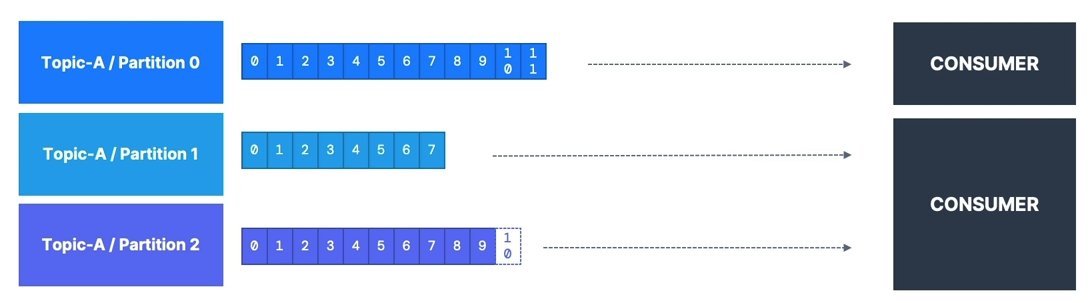
- Consumers read data from a topic (identified by name) — pull model
- Consumers automatically know which broker to read from
- In case of broker failures, consumers know how to recover
- Data is read in order from low to high offset within each partition
Deserialization
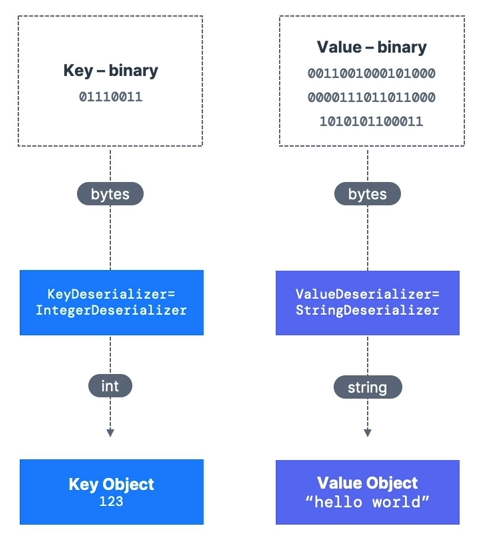
- Deserialize indicates how to transform bytes into objects/data
- Applied to both the value and the key of the message
- Common Deserializers:
- String (including JSON)
- Int, Float
- Avro
- Protobuf
- The serialization/deserialization type must not change during a topic’s lifecycle
- If needed, create a new topic instead
Consumer Groups
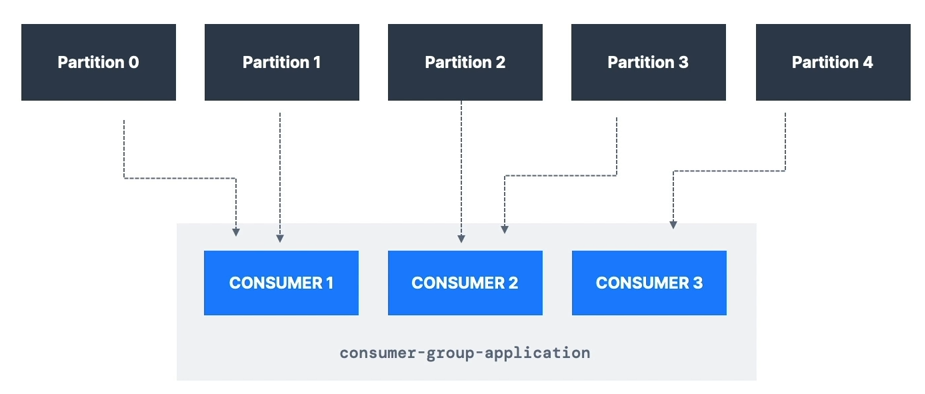
- All consumers in an application read data as part of a consumer group
- Each consumer within a group reads from exclusive partitions
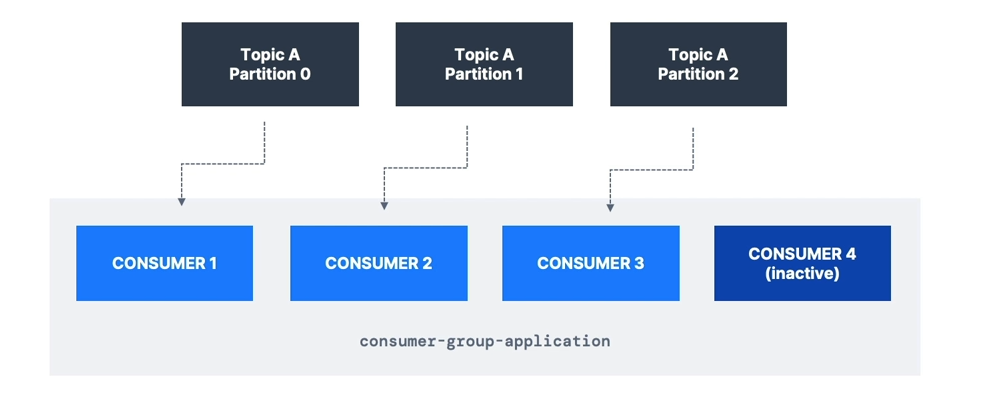
- If you have more consumers than partitions, some consumers will be inactive
- Apache Kafka allows multiple consumer groups to read from the same topic
- To create distinct consumer groups, use the consumer property:
group.id=<your-group-name>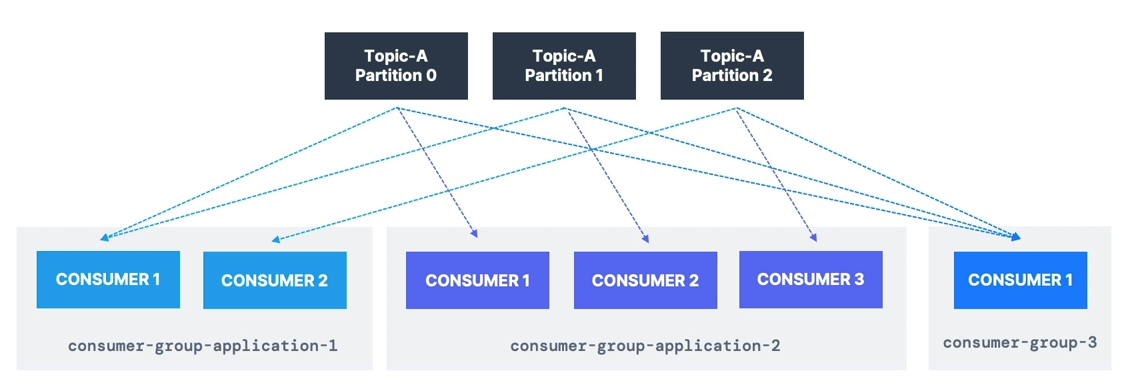
Consumer Offsets
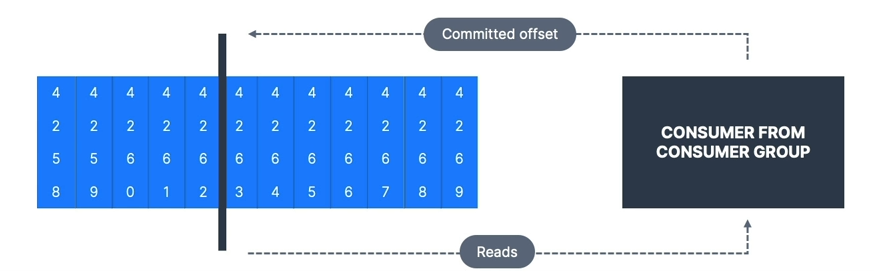
- Kafka stores the offsets for each consumer group in the internal topic:
__consumer_offsets
- When a consumer processes data, it should periodically commit offsets
- The Kafka broker writes to
__consumer_offsets(not the consumer group itself)
- The Kafka broker writes to
- If a consumer dies, it can resume from its last committed offset
Delivery Semantics
- Default: Java Consumers automatically commit offsets (at least once)
- Manual commit options:
- At least once (preferred)
- Commit offsets after processing the message
- If processing fails, the message will be read again
- Can cause duplicate processing, so ensure processing is idempotent
- At most once
- Commit offsets as soon as messages are received
- If processing fails, messages will be lost
- Exactly once
- Kafka → Kafka: Use Transactional API (easy with Kafka Streams API)
- Kafka → External System: Use an idempotent consumer
- At least once (preferred)
CLI Examples
- Consume from the tail of the topic
- Consume from the beginning of the topic
- Show both key and values in the output
- Learn about
--groupparameter - Observe how partitions are split among multiple CLI consumers
- List consumer groups
Consumer Groups & Partition Rebalance
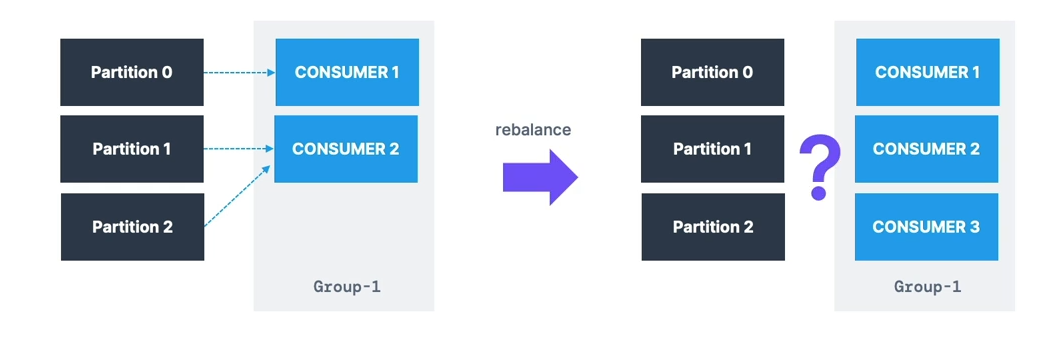
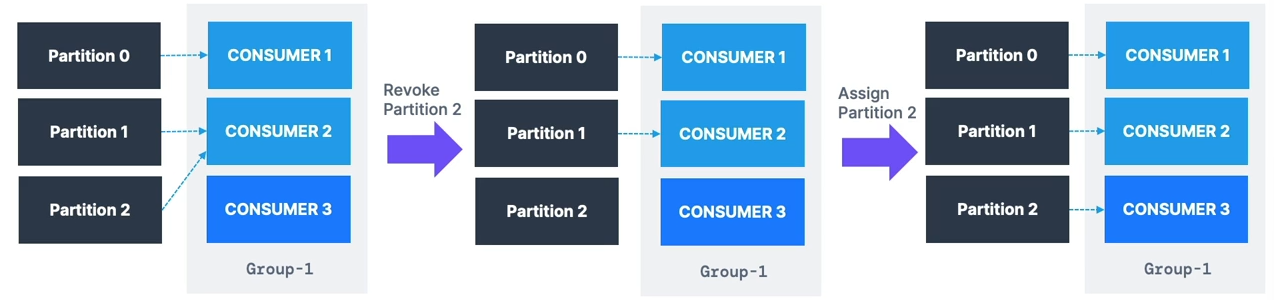
Eager Rebalance
- All consumers stop and give up their partition assignments
- Consumers rejoin the group and get new partitions
- Short period where no consumers process data
- Consumers may not get back their previous partitions
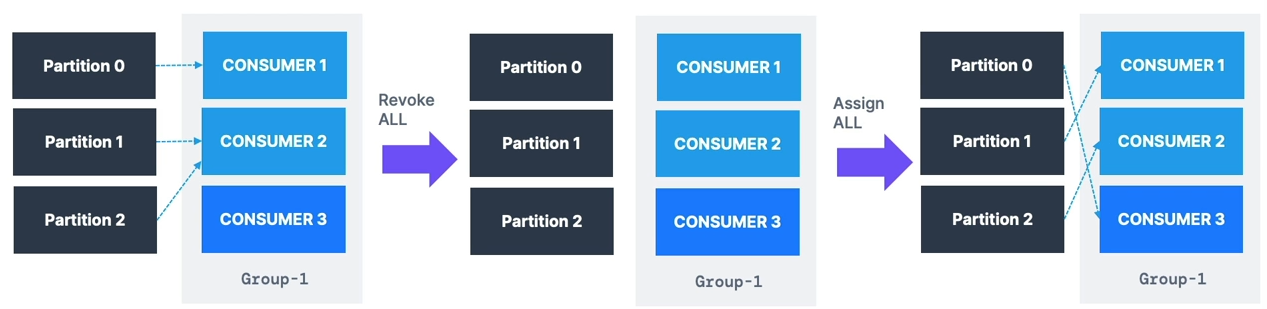
Cooperative Rebalance (Incremental Rebalance)
- Only a subset of partitions is reassigned
- Consumers without reassigned partitions keep processing
- Multiple iterations may occur to achieve stability
- Avoids stop-the-world pauses Partition Assignment Strategies:
RangeAssignor— per-topic basis; can lead to imbalanceRoundRobinAssignor— spreads partitions across all topics for optimal balanceStickyAssignor— like RoundRobin but minimizes partition movement when consumers join/leaveCooperativeStickyAssignor— supports cooperative rebalances so consumers keep processing Defaults:[RangeAssignor, CooperativeStickyAssignor]- Starts with
RangeAssignorbut can upgrade toCooperativeStickyAssignorwith a rolling restart
- Starts with
Less disruptive rebalancing is recommended.
Static Group Membership
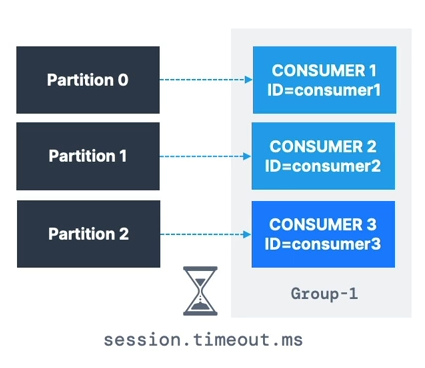
- By default, when a consumer leaves a group:
- Partitions are revoked and reassigned
- On rejoining, it gets a new member ID and different partitions
- Setting
group.instance.idmakes the consumer a static member- If it leaves, it has up to
session.timeout.msto rejoin and keep its partitions - Prevents unnecessary rebalances and helps maintain local state/cache
- If it leaves, it has up to
Auto Offset Commit Behaviour
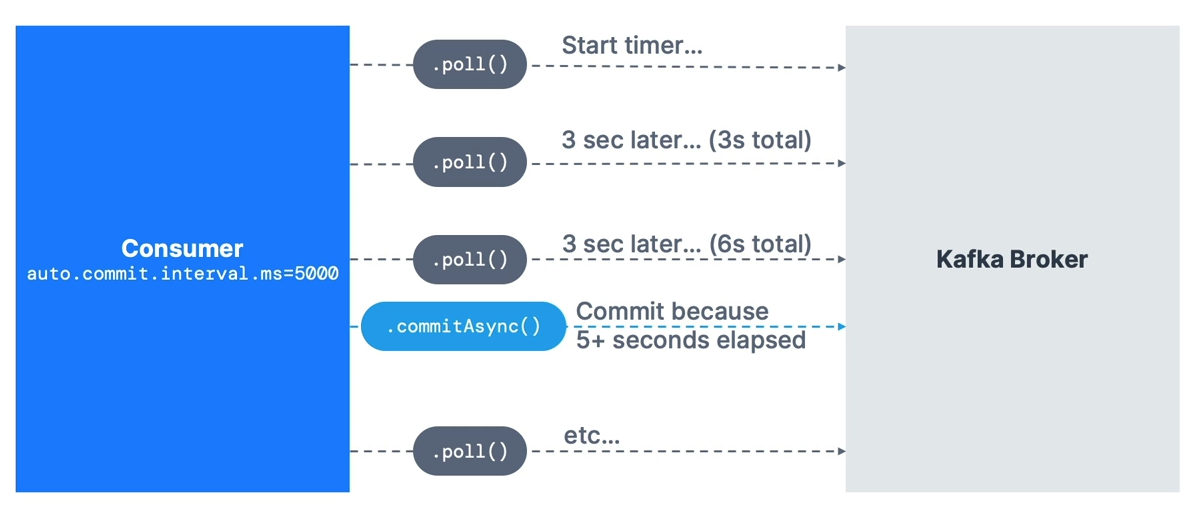
- In Java Consumer API, offsets are committed regularly
- Enables at-least-once delivery by default (under certain conditions)
- Offsets are committed when:
.poll()is calledauto.commit.interval.mshas elapsed
- Example:
enable.auto.commit=trueandauto.commit.interval.ms=5000 - Ensure messages are processed before calling
.poll()again - For advanced control:
- Disable
enable.auto.commit - Process messages in a separate thread
- Commit offsets manually using
.commitSync()or.commitAsync()
- Disable
Resetting offset
    public static void main(String[] args) {
        log.info("I am a Kafka Consumer!");

        String groupId = "my-java-application";
        String topic = "demo_java";

        // create Producer Properties
        Properties properties = new Properties();

        // connect to Localhost
//        properties.setProperty("bootstrap.servers", "127.0.0.1:9092");

        // connect to Conduktor Playground
        properties.setProperty("bootstrap.servers", "cluster.playground.cdkt.io:9092");
        properties.setProperty("security.protocol", "SASL_SSL");
        properties.setProperty("sasl.jaas.config", "org.apache.kafka.common.security.plain.PlainLoginModule required username=\"your-username\" password=\"your-password\";");
        properties.setProperty("sasl.mechanism", "PLAIN");

        // create consumer configs
        properties.setProperty("key.deserializer", StringDeserializer.class.getName());
        properties.setProperty("value.deserializer", StringDeserializer.class.getName());
        properties.setProperty("group.id", groupId);
        properties.setProperty("auto.offset.reset", "earliest");

        // create a consumer
        KafkaConsumer<String, String> consumer = new KafkaConsumer<>(properties);

        // subscribe to a topic
        consumer.subscribe(Arrays.asList(topic));

        // poll for data
        while (true) {

            log.info("Polling");

            ConsumerRecords<String, String> records =
                    consumer.poll(Duration.ofMillis(1000));

            for (ConsumerRecord<String, String> record: records) {
                log.info("Key: " + record.key() + ", Value: " + record.value());
                log.info("Partition: " + record.partition() + ", Offset: " + record.offset());
            }


        }


    }
public static void main(String[] args) {
log.info("I am a Kafka Consumer!");
String groupId = "my-java-application";
String topic = "demo_java";
// create Producer Properties
Properties properties = new Properties();
// connect to Localhost
// properties.setProperty("bootstrap.servers", "127.0.0.1:9092");
// connect to Conduktor Playground
properties.setProperty("bootstrap.servers", "cluster.playground.cdkt.io:9092");
properties.setProperty("security.protocol", "SASL_SSL");
properties.setProperty("sasl.jaas.config", "org.apache.kafka.common.security.plain.PlainLoginModule required username=\"your-username\" password=\"your-password\";");
properties.setProperty("sasl.mechanism", "PLAIN");
// create consumer configs
properties.setProperty("key.deserializer", StringDeserializer.class.getName());
properties.setProperty("value.deserializer", StringDeserializer.class.getName());
properties.setProperty("group.id", groupId);
properties.setProperty("auto.offset.reset", "earliest");
properties.setProperty("partition.assignment.strategy", CooperativeStickyAssignor.class.getName());
// properties.setProperty("group.instance.id", "...."); // strategy for static assignments
// create a consumer
KafkaConsumer<String, String> consumer = new KafkaConsumer<>(properties);
// get a reference to the main thread
final Thread mainThread = Thread.currentThread();
// adding the shutdown hook
Runtime.getRuntime().addShutdownHook(new Thread() {
public void run() {
log.info("Detected a shutdown, let's exit by calling consumer.wakeup()...");
consumer.wakeup();
// join the main thread to allow the execution of the code in the main thread
try {
mainThread.join();
} catch (InterruptedException e) {
e.printStackTrace();
}
}
});
try {
// subscribe to a topic
consumer.subscribe(Arrays.asList(topic));
// poll for data
while (true) {
ConsumerRecords<String, String> records =
consumer.poll(Duration.ofMillis(1000));
for (ConsumerRecord<String, String> record : records) {
log.info("Key: " + record.key() + ", Value: " + record.value());
log.info("Partition: " + record.partition() + ", Offset: " + record.offset());
}
}
} catch (WakeupException e) {
log.info("Consumer is starting to shut down");
} catch (Exception e) {
log.error("Unexpected exception in the consumer", e);
} finally {
consumer.close(); // close the consumer, this will also commit offsets
log.info("The consumer is now gracefully shut down");
}
}Graceful shutdown
    public static void main(String[] args) {
        log.info("I am a Kafka Consumer!");

        String groupId = "my-java-application";
        String topic = "demo_java";

        // create Producer Properties
        Properties properties = new Properties();

        // connect to Localhost
//        properties.setProperty("bootstrap.servers", "127.0.0.1:9092");

        // connect to Conduktor Playground
        properties.setProperty("bootstrap.servers", "cluster.playground.cdkt.io:9092");
        properties.setProperty("security.protocol", "SASL_SSL");
        properties.setProperty("sasl.jaas.config", "org.apache.kafka.common.security.plain.PlainLoginModule required username=\"your-username\" password=\"your-password\";");
        properties.setProperty("sasl.mechanism", "PLAIN");

        // create consumer configs
        properties.setProperty("key.deserializer", StringDeserializer.class.getName());
        properties.setProperty("value.deserializer", StringDeserializer.class.getName());
        properties.setProperty("group.id", groupId);
        properties.setProperty("auto.offset.reset", "earliest");

        // create a consumer
        KafkaConsumer<String, String> consumer = new KafkaConsumer<>(properties);

        // get a reference to the main thread
        final Thread mainThread = Thread.currentThread();

        // adding the shutdown hook
        Runtime.getRuntime().addShutdownHook(new Thread() {
            public void run() {
                log.info("Detected a shutdown, let's exit by calling consumer.wakeup()...");
                consumer.wakeup();

                // join the main thread to allow the execution of the code in the main thread
                try {
                    mainThread.join();
                } catch (InterruptedException e) {
                    e.printStackTrace();
                }
            }
        });


        try {
            // subscribe to a topic
            consumer.subscribe(Arrays.asList(topic));
            // poll for data
            while (true) {

                ConsumerRecords<String, String> records =
                        consumer.poll(Duration.ofMillis(1000));

                for (ConsumerRecord<String, String> record : records) {
                    log.info("Key: " + record.key() + ", Value: " + record.value());
                    log.info("Partition: " + record.partition() + ", Offset: " + record.offset());
                }

            }

        } catch (WakeupException e) {
            log.info("Consumer is starting to shut down");
        } catch (Exception e) {
            log.error("Unexpected exception in the consumer", e);
        } finally {
            consumer.close(); // close the consumer, this will also commit offsets
            log.info("The consumer is now gracefully shut down");
        }


    }
Committing Strategy for Consumers
Two most common patterns:
-
Easy:
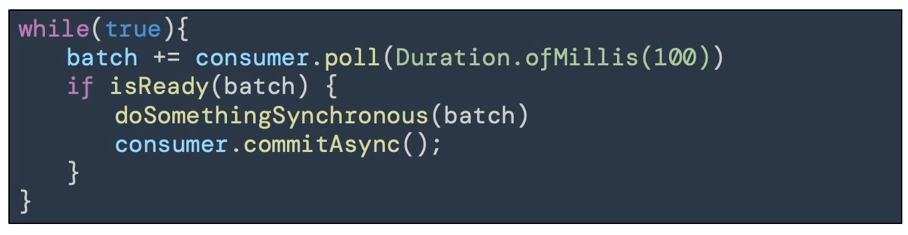
enable.auto.commit = true& synchronous batch processing. -
Medium:
enable.auto.commit = false& manual commit of offsets.
Auto Commit
-
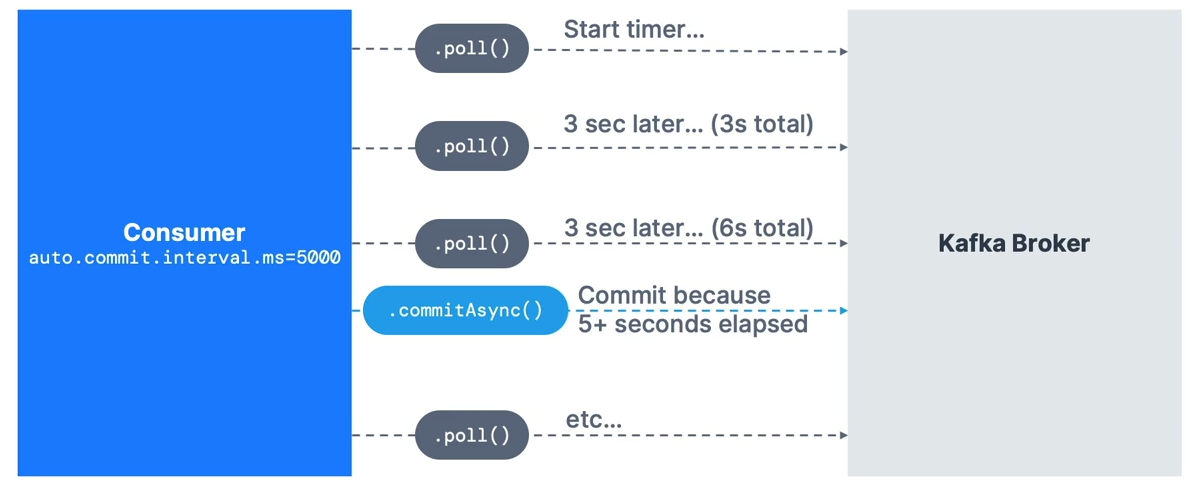
In the Java Consumer API, offsets are regularly committed.
-
Default behavior enables at-least-once reading (under conditions).
-
Offsets are committed when you call
.poll()andauto.commit.interval.mshas elapsed. -
Example:
auto.commit.interval.ms=5000andenable.auto.commit=truewill commit every 5 seconds. -
Ensure messages are successfully processed before calling
.poll()again — otherwise, you won’t have at-least-once guarantees.
Advanced option:
- Disable
enable.auto.commitand move processing to a separate thread, then call.commitSync()or.commitAsync()manually with the correct offsets.

⚠ If you don’t use synchronous processing, you’ll get at-most-once behavior because offsets are committed before processing.
Manual Commit
Configuration:
enable.auto.commit=false & synchronous batch processing.
-
You control when offsets are committed and under what conditions.
-
Example: Accumulate records into a buffer → flush to a database → commit offsets asynchronously.
-
Advanced: Store offsets externally and manage partition assignments manually using
.seek().
Use this if:
-
You need exactly-once processing and cannot achieve idempotency.
-
You combine “process data” + “commit offsets” in a single transaction.
⚠ Not recommended unless you know exactly what you’re doing.
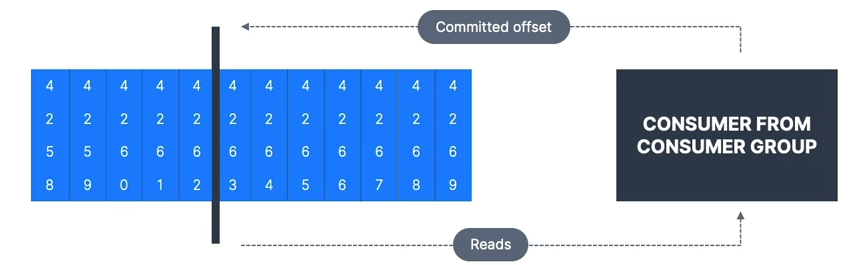
Consumer Offset Behaviour
A consumer is expected to read from a log continuously.
-
If your consumer is down for longer than Kafka’s retention period (e.g., 7 days), offsets become invalid.
-
Behavior when no offset is found:
-
auto.offset.reset=latest→ read from the end of the log. -
auto.offset.reset=earliest→ read from the start of the log. -
auto.offset.reset=none→ throw an exception.
-
-
Offsets can be lost if:
-
Kafka < 2.0: Consumer inactive for 1 day.
-
Kafka ≥ 2.0: Consumer inactive for 7 days.
-
Controlled by
offset.retention.minutesbroker setting.
-
Replaying Data for Consumers
Steps:
-
Stop all consumers from a specific group.
-
Use
kafka-consumer-groupscommand to set offsets to the desired position. -
Restart consumers.
Bottom line:
-
Set proper data and offset retention periods.
-
Ensure your
auto.offset.resetsetting matches your expectations. -
Use replay capability if needed.
Rack Awareness
-
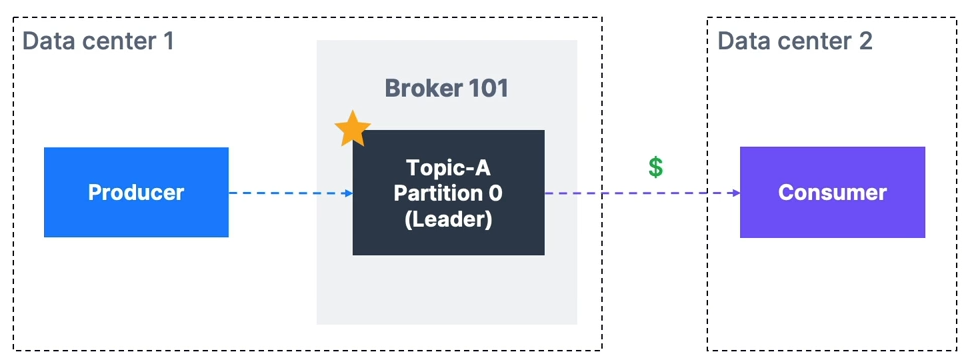
By default, Kafka consumers read from the leader broker for a partition, which can cause higher latency and network costs (e.g., AWS cross-AZ charges).
-
Since Kafka 2.4, consumers can read from the closest replica, improving latency and reducing costs.
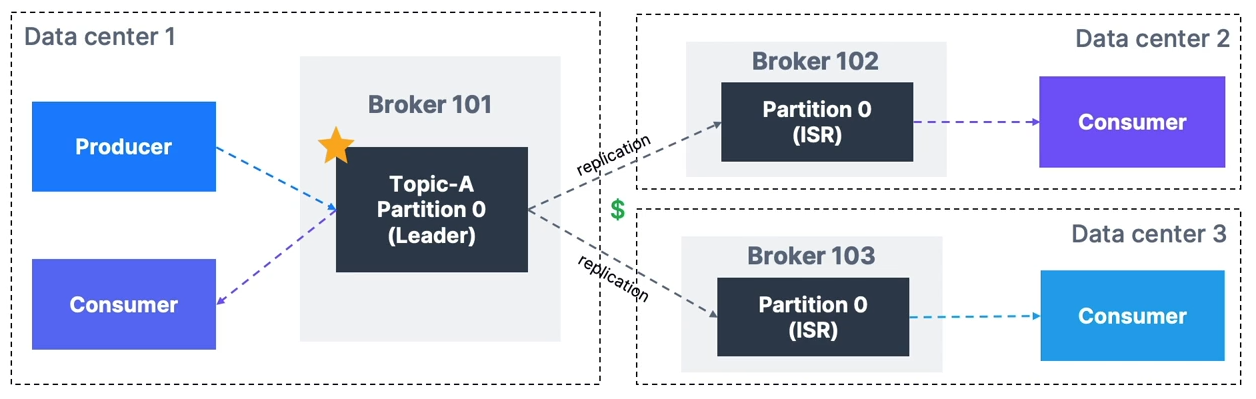
How to Set Up Rack Awareness
Broker settings:
-
Kafka v2.4+ required.
-
rack.id→ set to data center ID (e.g., AWS AZ ID). -
Example:
rack.id=usw2-az1 -
replica.selector.class=org.apache.kafka.common.replica.RackAwareReplicaSelector
Consumer settings:
- Set
client.rackto the data center ID where the consumer runs.
Partition Count and Replication Factor
These two parameters greatly impact performance and durability.
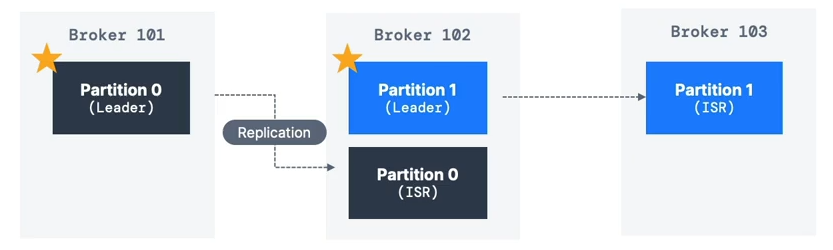
Replication Factor
-
Recommended: 3 (requires at least 3 brokers).
-
Trade-offs:
-
Higher RF → better durability & availability.
-
Higher RF → more latency (acks=all) & more disk usage.
-
Partition Count
-
Each partition can handle a few MB/s throughput — measure for your setup.
-
More partitions → better parallelism & throughput.
-
Guidelines:
-
Small cluster:
3 × #brokers -
Large cluster (>12 brokers):
2 × #brokers -
Adjust for consumer parallelism and producer throughput.
-
-
Avoid creating topics with 1000+ partitions without testing.